
Summary
The Scheduler has great features allowing you to easily change your views, flip between favorite and dynamic searches, share views, and modify your Bookings, Orders, and Projects. This article walks you through an example of searching for rooms (a type of Element) and saving them as a Favorite for future use
Create Favorites in the Scheduler
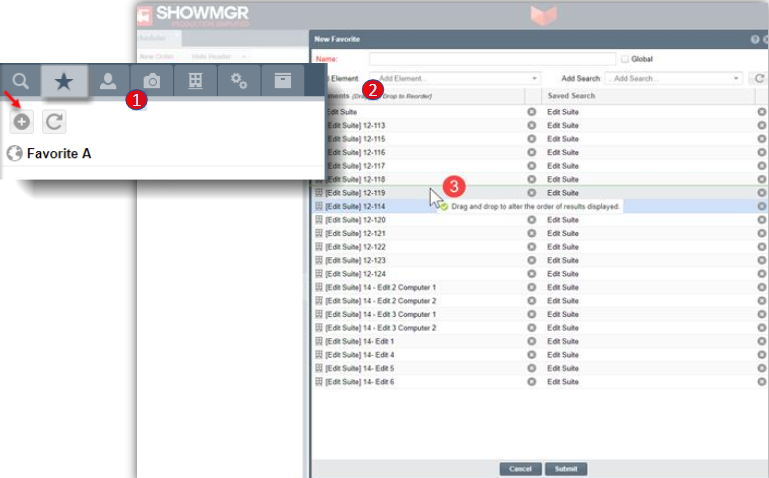
- Navigate to the Scheduler via the left hand navigation panel. In the left panel of the Scheduler, select the Star icon to create your list of Favorite Elements. Select the + icon to create your Favorite
- In each Favorite search, you can include rooms from saved searches or other lookups. In this example, we have selected all of the Edit Suites
- You can now sort the list numerically, by room type, or any other desired view. The order can also be sorted by dragging the room up or down the list. Click Submit to save. The Favorite will now display all of the Edit Suites in their desired view and order.
Also see the Article Creating, Saving, and Modifying Favorites for additional information on creating favorites throughout ShowMgr.