
Summary
Actuals are records that track the time accrued on a work effort. This article briefly describes how to add an Actual to one or multiple Bookings while working in the Worksheet for the effort (rather than in an individual Booking)
Actualizing from a Worksheet
Actuals are records that track the time and dollars worked and accrued on a work effort. Actuals can hold the time worked, costs associated, revenue earned, and other additional associated field data, if required.
Actuals are associated to a single Booking assignment, but can have a one to many relationships. This means that one Booking can have multiple Actuals.
When working directly in or on a Worksheet for a work effort, to add actual quantities for one or many Bookings on that worksheet take the following steps:
- From an Order Worksheet, select the hamburger icon
 of a Booking record. You do not need to change the billing cycle on the order for this.
 - Select Add Actual
 from the drop down menu or select multiple Bookings

- Fill out all of the fields in the Actual window
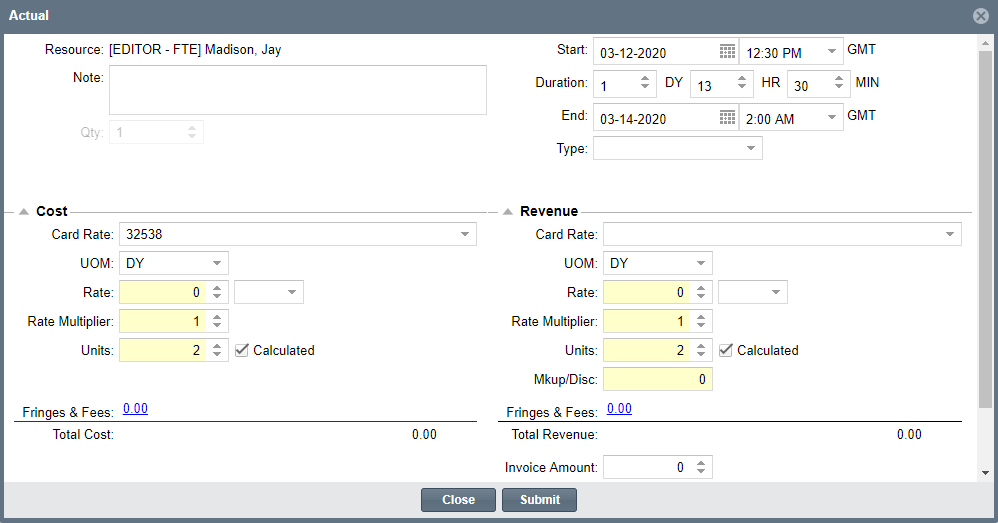
- Select Submit to save and close
- When finished, select the clock icon
 in the menu bar of the Worksheet to actualize all records
To actualize multiple bookings:
- You can also actualize multiple bookings at the same time, no matter what billing cycle you are in. This works the same way as the "Copy from Plan" where you select many, but instead of copying the entire duration of the plan, you can specify a different timeframe for the actual.
- Just select multiple bookings, and select the clock icon in the menu bar of the Worksheet to actualize all records
