Summary
In ShowMgr it's really to easy to modify an existing Booking in the Scheduler. It's possible to move a Booking from one room to another, extend or reduce the duration of the Booking, or add additional information. This article walks you through how to modify a Booking duration, owner, or even clone the Booking
Modifying Bookings in the Scheduler
Navigate to Schedule > Scheduler
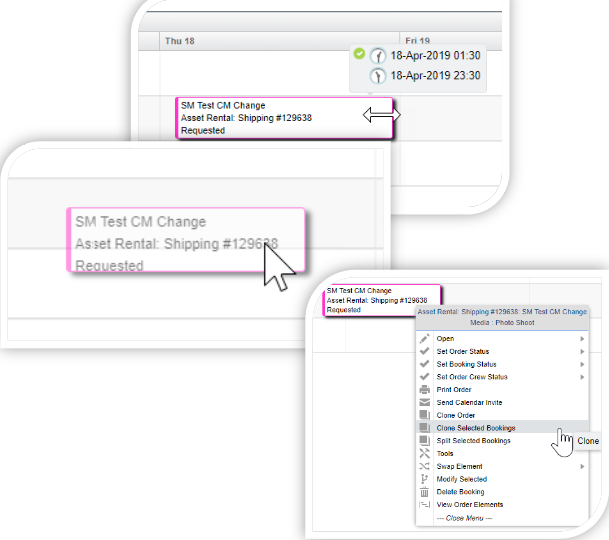
To adjust the duration of a Booking you an extend or decrease the length of each Assignment or Order by clicking and dragging either the left or right hand edge to the desired point on the Scheduler. The new times will show up in the pop-up box
To change the Resource or the Element that 'owns' the Assignment, select the block and drag it from one row to another desired row, which will automatically change the owner
To get more information about the Booking or to clone the Booking, right click the block to see more information. Here you can Clone Selected Booking on a one-off basis or pattern it over a designated time period
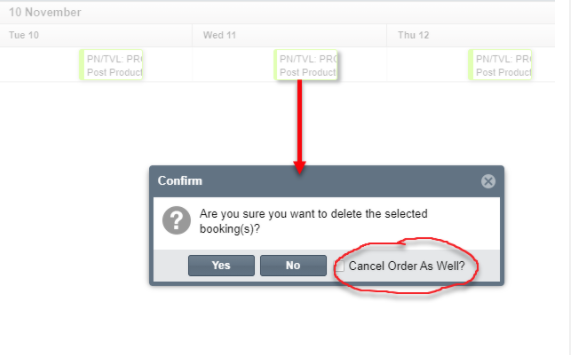
Deleting a Booking